
How to get into Legend Legacy
The game runs in the browser, on computer and mobile, with nothing to download. Pick your way: they all use the same account.
- Computer
- Mobile
- “Install the game” (Chrome)
- iPhone (Home Screen)
- Launcher for Windows and Mac
- Android app
On computer, in the browser
The fastest way: nothing to download.
- Open Chrome, Edge, Firefox or Safari.
- Go to legendlegacy.com.br.
- First time? Click Play now and create your account (username, password and email).
- Already have an account? Click Log in, type your username and password and click Enter the Kingdom.
To play in full screen, press F11 on Windows or Control + Command + F on Mac. Tick “Remember my login” only on your own computer.
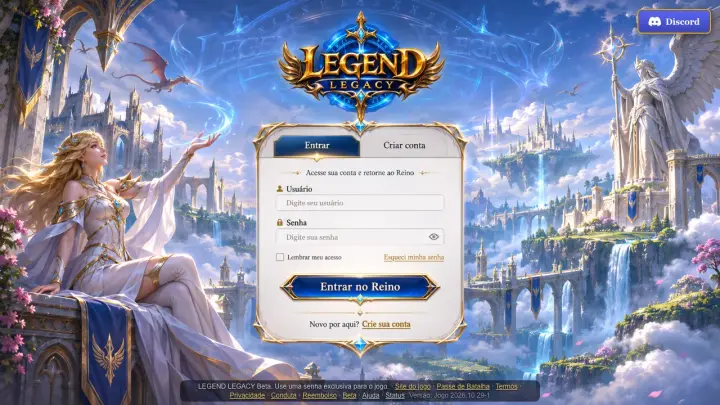
On mobile, in the browser
- Open Chrome (Android) or Safari (iPhone).
- Go to legendlegacy.com.br and tap Play now (new account) or Log in.
- Turn your phone sideways: the game is made for landscape.
- On Android, the game goes full screen on the first tap.
Opened it from Instagram or Facebook? The in-app browser of those apps doesn’t rotate the game. Tap ⋯ or ⋮ in the corner and choose Open in browser (the game also shows this notice). To always play in full screen, install the game: see the next two steps.
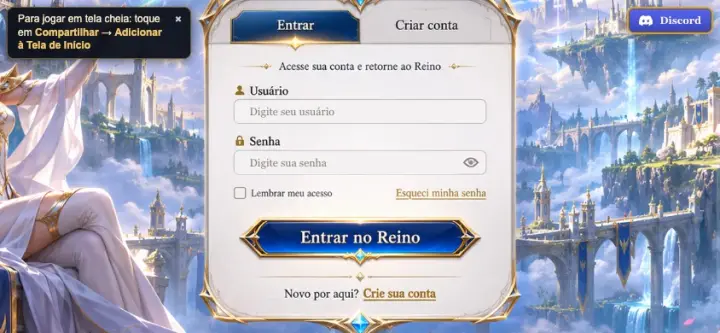
“Install the game” from Chrome (Android and computer)
Chrome adds a Legend Legacy icon to your phone or computer. From the icon, the game opens in full screen, without the browser bar. It takes almost no space: the game keeps loading from the server.
On Android
- In Chrome, go to legendlegacy.com.br/s1.
- On the login screen, tap Install the game and confirm with Install.
- If the button doesn’t appear, tap ⋮ (top corner) → Add to Home screen → Install.
- Open it from the Legend Legacy icon on your phone screen.
On computer
- In Chrome (or Edge), go to legendlegacy.com.br/s1.
- Click the install icon at the end of the address bar (a screen with an arrow), or open the ⋮ menu and look for Install Legend Legacy (in some versions it is under Cast, save and share).
- Confirm with Install. The shortcut appears on the desktop and in the Start menu (or Launchpad on Mac).
iPhone and iPad: Home Screen (Safari and Chrome)
On iPhone there is no “Install”, but you can add the game to the Home Screen. From the icon, it opens in full screen, without the browser bars.
In Safari
- Go to legendlegacy.com.br/s1.
- Tap Share (the square with the arrow pointing up). If you don’t see the button, tap ⋯ first.
- Scroll the list and tap Add to Home Screen → Add.
In Chrome on iPhone
- Go to legendlegacy.com.br/s1.
- Tap Share, in the address bar.
- Tap Add to Home Screen → Add.
After that, always open from the Legend Legacy icon on the Home Screen and turn the iPhone sideways.
Launcher for Windows and Mac
A small program that opens the game in a window of its own, without browser bars. It is the same game and the same account as the site: the game keeps loading from the server, so you always play the newest version.
- Download the file for your system on the download page (button below).
- Windows: open the downloaded file and follow the installer (it does not ask for an administrator password).
- Mac: open the .dmg file and drag Legend Legacy to the Applications folder.
- Open Legend Legacy and log in with your username and password.
The launcher does not have a paid signature from Microsoft or Apple yet. That is why, the first time, Windows (blue screen “Windows protected your PC”: click More info → Run anyway) and Mac (System Settings → Privacy & Security → Open Anyway) ask for confirmation. Always download from this site: the download page shows the step by step for each warning and the SHA-256 code of each file.
Android app (APK)
The Legend Legacy app for Android, installed directly from our site (outside the Play Store). It opens the game in full screen, like a regular app.
- On your Android phone, tap Download the app just below and, on the download page, Download.
- Open the downloaded file. If Android asks, allow the browser to install apps (it can be just this once).
- Tap Install and then Open. Log in with your username and password.
Why does Android show extra warnings?
Since 30/09/2026, in Brazil, Google requires every app installed outside the Play Store to come from a developer it has verified. Legend Legacy’s verification is still in progress. Meanwhile, Android uses the advanced flow: it shows extra protections and asks for a wait before allowing the install.
This is normal and does not mean the app has a problem. Read each screen carefully and follow what Android itself asks. Do not install another program to “skip” the wait and do not turn off your phone’s protections.
Don’t want to wait? Chrome’s “Install the game” gives you the same game, with an icon and full screen, with no warnings.